I. Preparation Before Authorization
-
Ensure Account Status is Normal
-
Registered TEMU Seller Center account and completed store verification.
-
Enter Temu Seller Center to Obtain Token Code
-
https://agentseller.temu.com/, search keyword: XM
-
To bind the store, please authorize Order Permissions
II. Authorization Flowchart
TEMU Seller Center → Service Market → Authorization Management → Click "Authorization Management (Orders)" → [+Get Authorization] → Search for "XM" → Confirm application XMHelper → Copy Token → Enter Token in XM Helper → Name Store → Complete Binding
Note: When binding a store, you need to name the store; when only authorizing, there is no need to name the store again.
III. Authorization Steps
-
Enter TEMU Seller Center Authorization Page
-
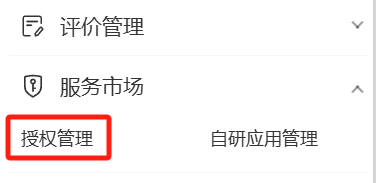
Log in to TEMU Seller Center → Click [Service Market] in the left navigation bar → Select [Authorization Management] → Click "Authorization Management (Orders)".
)
)
-
Add New Authorized Application
-
Click [+Get Authorization] → Enter "XM" in the search box → Find application XMHelper → Select All special authorizations → Click [Confirm].
)
)
-
Obtain Token Code
-
After the system generates the Token, copy the code completely (Note: The Token is displayed only once and must be saved immediately).
)
-
Return to XM Helper to Complete Binding
-
Log in to XM Helper → Go to [Store Management] → Click [Bind TEMU Store] → Enter the copied Token code → Customize Store Name (recommended to match the TEMU store name) → Submit to complete binding.
)
-
Authorize Product Permissions
-
XM Helper Backend → Click [Store/Mobile Authorization] at the top of the page → Authorize [Product and Inventory Management Permissions] → Repeat steps 1-4 above (The only difference is that the Temu authorization page changes to: Products) → Enter the copied Token code → Submit to complete authorization.
)
)
IV. Notes
-
Difference Between Product and Order Authorization
-
Both authorizations are required. For binding stores, please authorize Order Management, then proceed to authorize Product Management.
-
Token Expired?
-
If the Token was not copied in time, it needs to be regenerated by re-authorizing in the Temu Seller Center.
Comments
0 commentsNo comments yet — be the first to speak
If this piece sparked a thought, leave a comment and share your take.