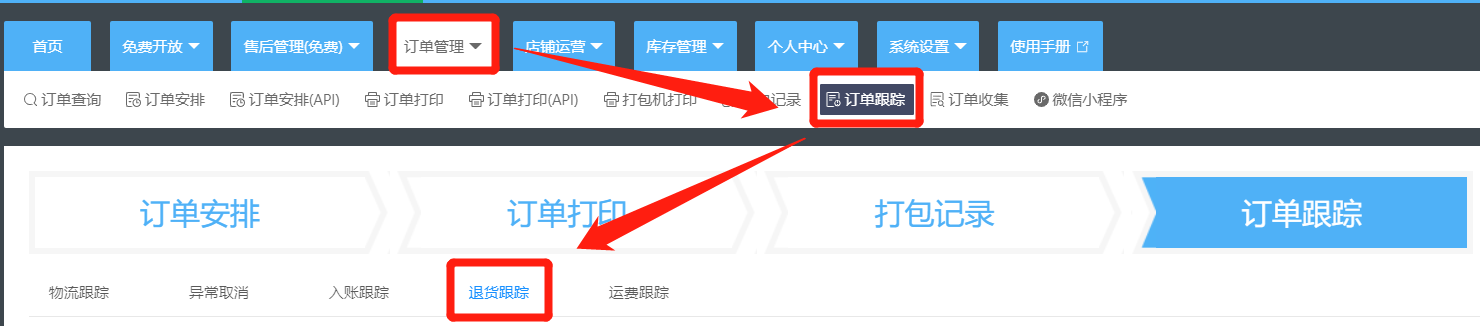
I. Tracking Status Description
-
Returning: The package is still in transit back to the seller and has not yet arrived at the seller's warehouse.
-
Returned but Not Scanned for Inbound: The package has been returned to the seller's warehouse, but the seller has not scanned it for confirmation.
-
Returned and Scanned for Inbound: The package has been returned to the seller's warehouse, and the seller has scanned it for confirmation.
All packages returned daily must undergo a scan-to-return operation to ensure the accuracy of return tracking data.
For orders that remain in the status of 【Returning】 or 【Returned but Not Scanned for Inbound】 for a long time, you should promptly verify them or contact the platform logistics provider to confirm whether the items are lost.
)
)
II. How to Perform Scan-to-Return Operations
- Use the XM WeChat Mini Program or Android APP (Click here to download via scan) to perform scan-to-return operations.
)
- Connect a scanner gun on the PC version to perform scan-to-return operations.
)
)
- If you use the inventory management feature, you can check the option for inbound storage when scanning returns.
)
Comments
0 commentsNo comments yet — be the first to speak
If this piece sparked a thought, leave a comment and share your take.