I. Two Printing Methods
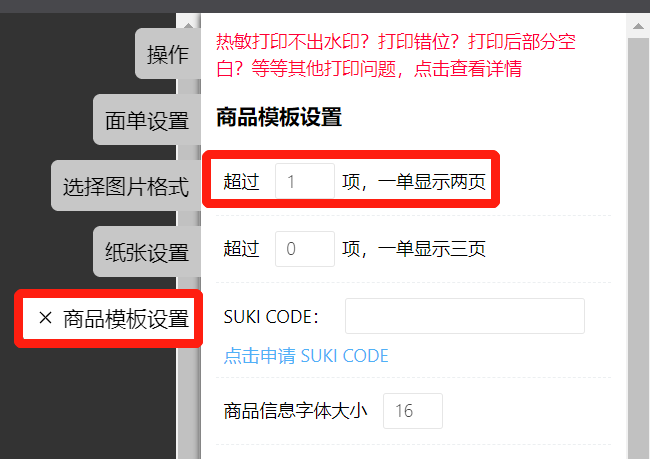
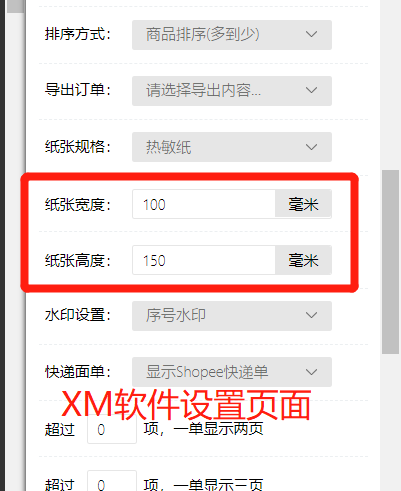
- Print both the shipping label and product details onto thermal paper, using two sheets of 100×150mm thermal paper. One sheet prints the shipping label, and the other prints the product details, arranged in this sequence.
The advantage is that it eliminates the step of manually matching shipping labels with product detail sheets. However, thermal paper costs are higher, and the print quality for product images is not clear.
)
)
The printing configuration panel on the right must be set to: If more than 1 item, display two pages per order
- Print the shipping label on 100×150mm thermal paper, and print the product details on A4 paper. Both types of paper can be printed simultaneously. After printing, use the serial numbers printed on the papers to match them one by one.
The advantage is that A4 paper is cheaper, the print quality for product images is excellent, and color images can be printed. The disadvantage is that manual matching of the two types of paper is required.
)
)
)
Switch the paper specification to: A4 paper, and do not check "Display Shipping Label," print only the product detail sheet.
Then click the bottom right corner: Print the corresponding shipping label separately to print the shipping label.
)
)
The two types of paper can be printed simultaneously by connecting two printers to the same computer.
The printing pages for both types of paper must be open and operated at the same time, and do not close either page until both have finished printing.
This avoids situations where printing serial numbers do not match.
II. Order Sorting (Key Point)
On the print delivery note page, the printing configuration panel on the right provides four sorting options:
Time Sort: Sorts orders by their placement time.
Quantity Sort: Sorts orders by the total quantity of individual items.
Product Sort: Comprehensively sorts orders by product model number (Recommended).
SKU Quantity Sort: Sorts based on the attributes of product categories in the order.
It is recommended to select [Product Sort]. Using this sort before printing orders can significantly improve the speed of picking and packing.
)


Comments
0 commentsNo comments yet — be the first to speak
If this piece sparked a thought, leave a comment and share your take.