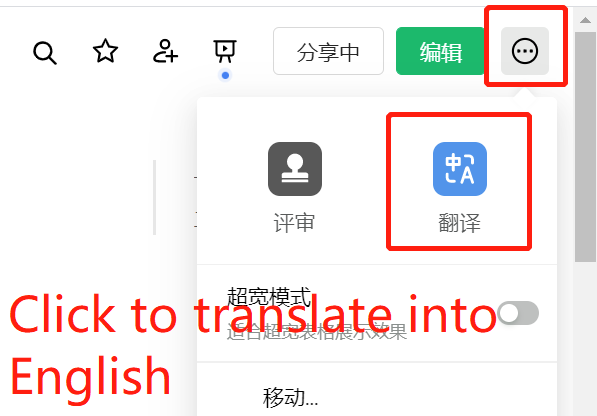
PC browser, click to translate into English
)
First, print orders when the status is [To Pack/Packed]. After printing and packing, use the XM WeChat Mini Program (which allows multiple mobile devices to operate simultaneously) or a barcode scanner to scan each package individually for arrangement. This changes the order status from [To Arrange Shipment] to [To handover], ready for courier pickup.
The benefit of this approach is that it prevents delayed shipments, which could result in penalty points for your store.
Currently, many sellers are still accustomed to Shopee's workflow—arranging first, then printing—which often leads to delayed shipments.
I. Lazada Order Operation Process
)
Assign Logistics >> Print Orders >> Arrange Orders
Step 1: Assign Logistics
- Manual Assignment: Select the orders that need logistics assignment, then click the [Assign Logistics] button.
)
- Automatic Assignment: Click the [Enable Automatic Logistics Assignment] button to turn on the feature.
)
)
Step 2: Print Orders
Orders with assigned logistics (status Packed) should be in [To Arrange shipment]. Once arranged, the order status becomes [To Handover].
For specific printing procedures, please refer to Tips for Printing Shipping Labels and Product Details.
Step 3: Arrange Orders
- Use the mobile WeChat Mini Program or Android APP (Click here to download via QR code) to scan and arrange orders.
)
)
- Use a barcode scanner connected to a computer to arrange orders.
)
II. Usage Details
- In the top-left corner of the operation bar, click the [More] button to search/filter all orders. Options include: Order Number Search, Tracking Number Search, Product Title, Product ID Search, Seller SKU Search, Product Attribute Search, etc.
)
)
- On the API version operation bar, there is a [Load Product Attribute Images] button. When used, it switches the product images in the picking list and shipping list to attribute images. By default, the API version fetches the main product image.
)
- Both the Order Arrangement and Order Printing pages allow you to print and export picking lists. Please select the required orders before performing these operations.
)

Comments
0 commentsNo comments yet — be the first to speak
If this piece sparked a thought, leave a comment and share your take.